The last post explored the importance of making connection: bringing more meaningful learning experiences while alleviating today’s workforce epidemic of loneliness and the feeling of being disconnected. The key: designing and facilitating virtual sessions so they generate social learning signals rather than simply deliver content. Working to expand L&D’s presence in the social infrastructure and continuous learning arenas combines technology, participation, and network-building.

1. Strengthening Social Infrastructure in the Virtual Classroom
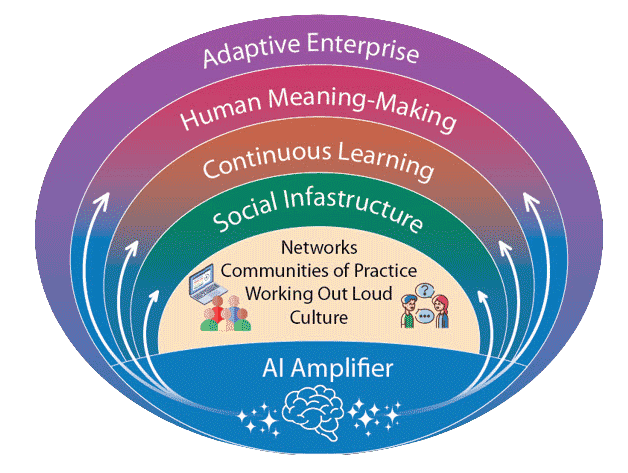
Social infrastructure includes networks, communities of practice, working out loud, and culture. Virtual classrooms can help build all four.
Networks
Use the virtual classroom to connect people who rarely interact.
Ideas:
- Rotate breakout groups across sessions so participants meet different colleagues.
- Include cross-functional participants in the same course.
- Use short “who else is working on this?” discussions to help people identify peers.
Over time, the session becomes a hub for networking.

Communities of Practice/Communities of Practitioners
Virtual classrooms can support existing communities or help launch new ones.
Ideas:
- Run recurring community sessions where practitioners discuss real cases.
- Invite participants to bring a current challenge rather than a hypothetical example.
- Use the session to surface emerging practices within the group.
This helps shift the virtual classroom from instructional event to professional forum.
Working Out Loud
The virtual environment is ideal for practicing visible work.
Ideas:
- Ask participants to briefly explain a decision they made recently.
- Have learners share a screenshot, process map, or draft in breakout rooms.
- Use collaborative tools (shared documents, whiteboards) for quick case reflections.
- Host show-and-tell sessions for participants to share work products and discuss the problem they solve, the challenges in developing the products, etc.
Participants practice making thinking visible, which strengthens connections and social learning, and articulating their practice, which helps make tacit knowledge more explicit.
Culture
Virtual classrooms can reinforce cultural norms that support learning.
Ideas:
- Normalize questions and uncertainty.
- Encourage participants to build on one another’s comments.
- Model curiosity and respectful challenge.
When sessions feel psychologically safe, participants are more likely to carry those behaviors back to work.
2. Supporting Continuous Learning
Virtual classrooms can support ongoing learning by extending interaction beyond the scheduled session.
Ideas include:
- Assign short between-session activities, such as interviewing a colleague or sharing a reflection in an online space.
- Encourage participants to return with an example from their work.
- Use asynchronous discussion channels for follow-up conversations.
The goal is to make learning ongoing rather than event-based.
3. Strengthening Human Meaning-Making
4. Creating Learning Artifacts
Virtual classrooms can generate useful knowledge artifacts that persist beyond the session.
Examples:
- short case summaries
- shared whiteboards
- lists of lessons learned
- compiled participant insights
These artifacts help create organizational memory, offer material that can be revisited and shared, and provide richer inputs for AI tools.
A Hub, Not an Endpoint
The virtual classroom is not just a place to deliver training. It is a place where networks form, work becomes visible, experiences are interpreted together, and new insights emerge. When designed intentionally, the virtual classroom becomes a hub for social learning and collective meaning-making.
Learn More: Listen To Jane Bozarth and David Kelly in their Podcast The Future of Learning Is More Human, Not Less


 Jennifer Hofmann : Apr 30, 2026, 9:00:04 AM

 Karen Vieth